Data partners can now edit their metadata. However, data partners can still provide updates with the NBN Atlas team to update the metadata if this is preferred.
With this role data partners can edit the following metadata for data partner and data resource pages (unless indicated otherwise):
- Data partner/resource name
- Website link – e.g., to a relevant webpage
- Logo
- Representative image
- Location, e.g., where your organisation is based
- Email – this should be a general email address for you organisation or group
- Phone number
- Contacts – who should be contacted regarding data queries, can respond to record annotations. If you want to add contacts who can manage access to access-controlled data, please contact support@nbnatlas.org.
Please note for creating new data resources and updating public resolution settings on a data resource you will still need to contact the data team (data@nbnatlas.org).
If you would like to be able to edit your data partner and data resource metadata, please contact support@nbnatlas.org with the following information:
- Email address for the registered account which should have access to edit the metadata. We recommend creating an NBN Atlas account for a general team email, as this reduces issues such as when there are staff changes.
- Let us know if you want this email to be publicly visible on the data partner page (if is not already).
Once you have the metadata editor role you can follow the steps below to edit the metadata:
Step 1
Navigate to your data partner page, see full list of data partners here.
Step 2
Click on the Edit button.
Step 3
Click the Edit button for any of the sections to edit the information.
Editing the Description section
Text can be formatted to be bold, italicised, underlined, or bulleted using the following techniques:
- +BOLD+
- _italic text_
- *bullet point – if you want to use * to reference to something elsewhere in the text, use the following ‘+*+’. This makes the * bold and stops it from bulleting the text.
To create a new line in the text, simple enter a blank line between the paragraphs. Please note that the line breaks are not visible when viewing the saved text on the metadata editor page. But you can check the text is correctly formatted by viewing the public page – you will need to refresh the page if you had it open on a separate tab or window before editing and saving any changes.
Editing the licence (for data resources only)
The NBN Atlas will refer to the licence specified in the data file for a record. The licence in this section will determine which licence is shown on the data resource page, to communicate how NBN Atlas users can use the records. If no licence is set at record level (i.e., in the data file) this dataset-level licence is applied to the records. However, this will only apply to older data resources on the NBN Atlas, as it is now a requirement to provide record-level licence with the records.
Adding contacts
When adding a contact, you can either add an existing contact – i.e., are already in the database or create a new one i.e., they are not already in the database.
First please always check that a person/email is not already in the database. Click on the Choose existing contact text box and start typing the person’s name/email.
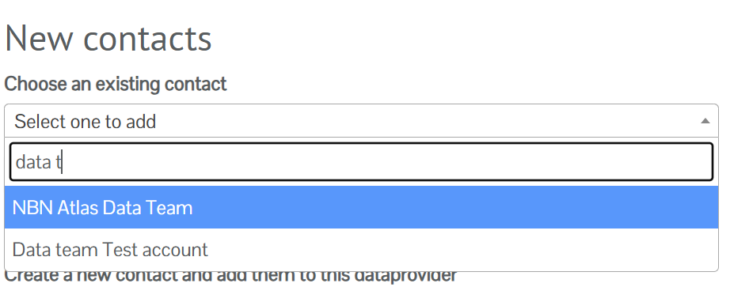
If there is a match click on the contact and then the Add existing contact button.
If there is no match, click on the Add new contact button.

Fill out the contact details and click the Create button.

You can edit the contacts details, e.g., name, email address, by clicking the Edit the contact’s details button. Note this will update the contacts details on any other data partner/resource pages where they are listed as a contact too.