
User Guide
The Wales INNS Portal, hosted by the National Biodiversity Network Atlas Wales supports the activities of the Wales Biodiversity Partnership Invasive Non-Native Species Group in providing a single resource to view and search records of INNS of interest to Wales that are held by the NBN Atlas.
This User Guide provides ‘How to..’ steps on performing the main functionality of the Wales INNS Portal.
Benefits of being logged into an NBN Atlas account
You are not required to have a NBN Atlas account and be logged into your account to access and use the Wales INNS Portal. However, you are required to log into an NBN Atlas account to download records from the Wales INNS Portal. You can download the records in a CSV format, allowing you to explore the records in further detail.
We recommend that you do create a NBN Atlas account and are logged in when using the Wales INNS Portal, as this allows us to log how the Portal is being used and demonstrate its impact.
Navigating to the Wales INNS Portal
You can navigate to the Wales INNS Portal here. You can also navigate to the Portal via the NBN Atlas Wales. See the steps below:
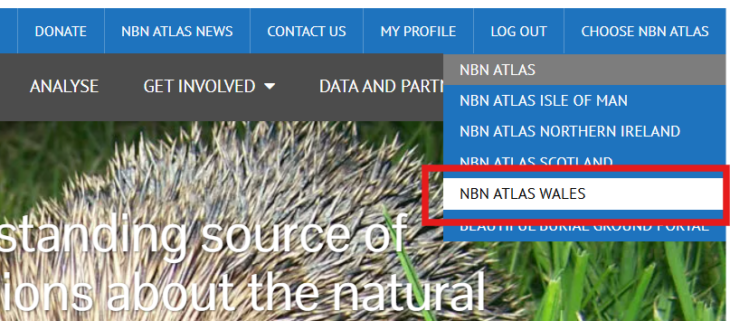
Go to the NBN Atlas Wales, either via the direct link or via the NBN Atlas, by click ‘Choose NBN Atlas’ and clicking ‘NBN Atlas Wales’
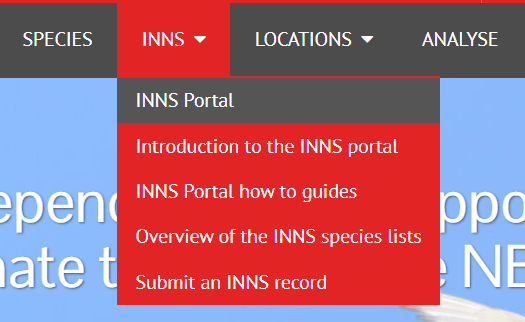
Once on the NBN Atlas Wales, click on ‘INNS’ and ‘INNS Portal‘
How to guides
- How to filter INNS taxa by list
- How to filter INNS taxa by attributes
- How to search for an individual species
- How to change the order of INNS search results and increase the number of INNS on a page
- How to download the list of INNS taxa
- How to view individual INNS information
- How to view species records on the map
- How to toggle species on and off on the map
- How to view all INNS occurrence records
- How to view filtered occurrence records
- How to view occurrence records for a single INNS
- How to download all INNS occurrence records
- How to expand occurrence records to include the English border
- How to view absence records
- How to access all the species lists on the NBN Atlas